Showing posts with label tutorial. Show all posts

Tuesday, October 6, 2020

USEFUL TUTORIAL - LIGHT SOURCES IN HOUSE


Hi! Today we will talk about something that brings unique magic to our homes during the Tibian night - light sources. In the past I didn't pay attention to it as I rarely used lighting effects in Tibia, but I try to keep my house nicely lit. 

Is there a way to choose the perfect light? Not for me, each house and each decoration requires separate work in this category. This means that I cannot give you a proven recipe, but I want to show you at least with examples how it changes the interior. 

Lighting settings are also important during the game. The lights are slightly different on the Mac and Windows versions. During the game itself, I usually turn off the lights unless they are required to complete the mission. 


MAC: ambient light 100% / level separator 100% / clouds & indoor effects 0%

Windows: ambient light 75% / level separator 75% / clouds & indoor effects 0%

Here is the best settings for lights. But You should find your own idea for it!


There are so many things that give light: rare items, store items, valuables, equipment... it would be difficult to list them all in one post, so we want to focus on the most interesting ones.


giant sapphire / giant ruby / giant emerald / giant topaz

/ turquoise tendril lantern / purple tendril lantern 
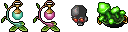
/ glowing mushroom / black skull /

trapped lightning / glass of goo / eye of the storm / sun mirror


/ giant amethyst / lit torch (quest item) / mining helmet / 
/ zaoan figurine (jade zaoan pawn on ss, but all of them have light) /


green light / seacrest pearl / charged ghost charm / frozen starlight

sun catcher / moon mirror / starlight vial / devourer core

small lamp / crystal lamp / snow globe / candle made of human tallow

/ luminescent crystals / the orb of light undying /
/ the orb of life everchanging / imbuing crystal /

 SOME IDEAS WITH LIGHT SOURCES

 'Underwood 7' by Dracek, owner Max Yield - Antica

Luminous Arc 2, Tynusiiaa - Antica

More about lights you can find in other fansites

Tibia Wiki - Light Sources
Tibiopedia - Źródła światła

Monday, July 27, 2020

HOW TO MAKE STACKS | TRICKS FOR STACKS


*** IF YOU DON'T SEE ALL THE PICTURES,  PLEASE WAIT. FILES ARE LARGE AND LOADS SLOWLY ***


Hello! Today I want to show You some tricks about stacks. We won't focus on what to arrange on them, but on the structure only. If we combine a bit, we can create unique things and connect items that we can't connect normally.
1 OPTION - HOW TO CONNECT TWO OBJECTS FROM THE STORE

Some items from the store (such as tables, chests or chairs) are objects on which we can put some thing. However, not always! In this proposal, I took two items that we can't connect when we just want to move them.

You should stand on the SQM where You want to place your composition. Next step is just simply unpacked items on top of each other (without moving from the spot!) with the sequence what you want to achieve. I wanted the lamp on the rose, so first I unpacked the plant and the lamp as the second.


2 OPTION  - HOW TO CONNECT Areca Palm +  OBJECT FROM THE STORE

In this option you have to make trap with coal basins around place when you need make stack. Remember! Only this sqm on which you are standing can be empty!  You have to log out and need  help second character. You have to put Areca Palm on this empty SQM inside. When you log in, you will stand on it. It isn't possible normally. Now You just need to unpack the selected item from the store (I used a rose again).


3 OPTION- EXTENDED STACK ON THE OBJECT FROM STORE

Unfortunately, the roses are beautiful, but theoretically we can't put something on them. However, there is a patent for it! You will need chest (no matter what type) and melee weapon (I prefer heavy machete) in place of weapon in equipment. You have to place chest under the item from the store and put into it these items what you would like to put on the roses. Unfortunately, sequence is important here. It's hard to explain by words, so take a look at the gifs. When you put items to crate, you need to destroy it by browse field.  Sometimes you have to "destroy" several times. Don't be afraid for your items - they won't get destroy! :) Remember about remove trash under stack.

- STACK VERSION WITH GOOD SEQUENCE - 


- STACK VERSION WITH  BAD SEQUENCE - 


4 OPTION - Areca Palm + NORMAL FURNITURE

Areca Palm allows us to place a few smaller things e.g. trophy stand, creatures. Unfortunately, if You want to place a coal basin on it, it isn't possible. In this case, simply place the packed coal basin under the palm and then unpack it by browse field.


5 OPTION - Areca Palm + NORMAL FURNITURE + EXTENDED STACK

Okay... and what if when we wanted a palm tree with coal basin on it and something else? Of course, it's possible! The easiest way to do this is: you will place a packed coal basin and crate with prepared stack under the palm. First, unpack the coal basin by browse field, then destroy the crate. Voila!


6 OPTION - TWO OBJECTS FROM STORE, BUT ONE LITTLE HIGHER

What if we want one item from the store a little higher? Place the crate (e.g. with trophy stand inside) and stand on it. You have to unpack item from the store at first. Then you need destroy it by browse field until we get a trophy stand on a plant, then unpack the second item from the store. Done!


That's all today. It's super easy, right? There are some people who actually know tips in our article, but for many Tibians these stacks are completely new decorating way. I hope you all enjoy it. Of course we waiting for your decorations on instagram (tag @tibiastyleofficial #tibiastyle #tibiastyleofficial)